
Customizing the inputs of an aiida-quantumespresso workchain#
Interacting with the workchain builder#
Workchain builder is a dictionary that specifies all the inputs of the workflow and all called calculations. It is the main object to interact with in order to change the default settings/parameters. Every workchain class includes get_builder() method to initialize an empty builder with the correct namespaces as well as get_builder_from_protocol() method returning a builder, prepopulated with default parameters defined in the simulation protocols (‘fast’, ‘balanced’ or ‘stringent’ as defined by Nascimento et al., arXiv2504:03962).
To check the builder structure in the interactive shell use the following commands for the relevant WorkChain:
from aiida_quantumespresso.workflows.pw.base import PwBaseWorkChain

builder = PwBaseWorkChain.get_builder()
builder
# -> builder inputs
or
from aiida import orm
from aiida_quantumespresso.workflows.pw.base import PwBaseWorkChain

from ase.build import bulk

builder = PwBaseWorkChain.get_builder_from_protocol(
    code = orm.load_code('pw@localhost'),
    structure = orm.StructureData(ase=bulk('Si', 'fcc', 5.43)),
    protocol='balanced'
)
builder
# -> builder inputs
Note that get_builder_from_protocol() requires structure and code arguments.
After providing the necessary information (see explanations below), the builder object is passed to run() or submit() methods of aiida.engine in order to perform the calculation.
from aiida.engine import submit

wkchain = submit(builder)
print(f"Submitted workchain with pk {wkchain.pk}!")
Customizing the pw.x input file#
Most of the input parameters can be customized directly through the builder. However, some inputs such as structure, pseudopotentials and k-points have to be provided using AiiDA-specific data types (see more detailed explanation below). Moreover, a few parameters such as the directory names for output and pseudopotentials as well as prefix are set by AiiDA and can not be modified.
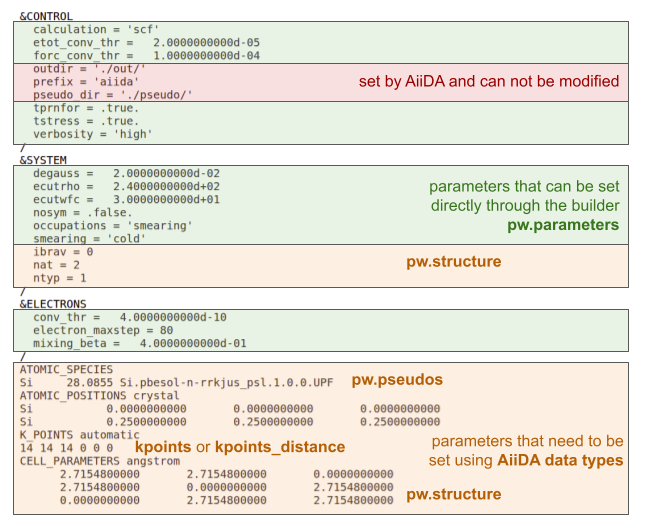
For example, cutoff parameters can be adjusted by modifying the builder dictionary:
from aiida import orm
from aiida_quantumespresso.workflows.pw.base import PwBaseWorkChain

from ase.build import bulk

builder = PwBaseWorkChain.get_builder_from_protocol(
    code = orm.load_code('pw@localhost'),
    structure = orm.StructureData(ase=bulk('Si', 'fcc', 5.43)),
    protocol='balanced'
)

builder.pw.parameters["SYSTEM"]["ecutrho"] = 300.0
builder.pw.parameters["SYSTEM"]["ecutwfc"] = 40.0
Inputs provided through AiiDA data types#
Crystal structure needs to be provided using AiiDA StructureData. More information on the relevant documentation page.
Pseudopotentials
Pseudopotentials are provided as UpfData data type. Usually they would be installed as part of the pseudopotential family via aiida-pseudo package. As explained in the package documentation, pseudopotential families can be installed via a command line interface, either from the provided libraries (SSSP and PseudoDojo) or by importing from a custom archive or folder.
By default, AiiDA-QuantumESPRESSO workchains are using pseudopotentials from SSSP v1.3 Efficiency
To use a different pseudopotential family installed via AiiDA-Pseudo, pass the required label to the overrides dictionary (see the Overrides section):
To directly specify the pseudopotentials from a certain AiiDA-Pseudo family one can use
get_pseudos()method:
from aiida import orm
from aiida_quantumespresso.workflows.pw.base import PwBaseWorkChain

from ase.build import bulk

my_structure = orm.StructureData(ase=bulk('Si', 'fcc', 5.43))

builder = PwBaseWorkChain.get_builder_from_protocol(
    code = orm.load_code('pw@localhost'),
    structure = my_structure,
    protocol='balanced'
)

family = orm.load_group("PseudoDojo/0.4/PBE/SR/standard/upf")
builder.pw.pseudos = family.get_pseudos(structure=my_structure)
K-points
K-points are specified through KpointsData that supports k-point meshes as well as custom k-point lists, and also features symmetry-based automatic calculation of k-point paths for electronic band structure calculation.
Refer to the Builder structures section to see where to specify these inputs in the builder dictionary depending on the WorkChain you are using.
Customizing the submission script#
The submission script can also be customized mainly through metadata.options namespace of the builder.
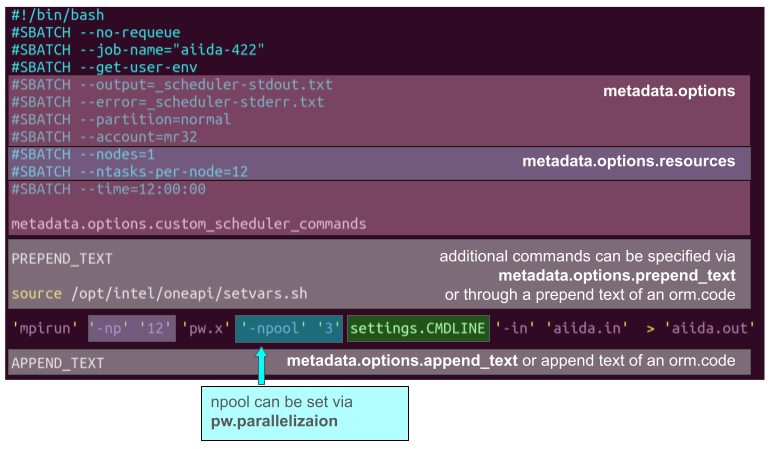
For example, when running PwBaseWorkChain
from aiida import orm
from aiida_quantumespresso.workflows.pw.base import PwBaseWorkChain

from ase.build import bulk

builder = PwBaseWorkChain.get_builder_from_protocol(
    code = orm.load_code('pw@localhost'),
    structure = orm.StructureData(ase=bulk('Si', 'fcc', 5.43)),
    protocol='balanced'
)

builder.metadata["options"]["queue_name"] = "normal" # to specify partition
builder.metadata["options"]["resources"]["num_machines"] = 1
builder.metadata["options"]["resources"]["tot_num_mpiprocs"] = 12
Full list of metadata available can be found at [AiiDA documentation page](link to this section of the real-world tips and tricks)
Overrides#
If many default inputs need to be overwritten, it is convenient to use the overrides keyword, provided by get_builder_from_protocol() function of the required workchain.
It is necessary to arrange the custom parameters into a dictionary respecting the structure of the builder of the workchain.
from aiida import orm
from aiida_quantumespresso.workflows.pw.base import PwBaseWorkChain

from ase.build import bulk

my_overrides = {
  "pseudo_family": "PseudoDojo/0.4/PBEsol/SR/standard/upf",
  "pw": {
    "parameters": {
      "SYSTEM": {
        "ecutrho": 300.0,
        "ecutwfc": 40.0
      }
    }
  },
  "metadata": {
    "options": {
      "queue_name": "normal",
      "resources": {
        "num_machines": 1,
        "tot_num_mpiprocs": 12
      }
    }
  }
}

builder = PwBaseWorkChain.get_builder_from_protocol(
    code = orm.load_code('pw@localhost'),
    structure = orm.StructureData(ase=bulk('Si', 'fcc', 5.43)),
    protocol='balanced',
    overrides=my_overrides
)
Accessing the simulation directory and all files#
In order to go to the calculation folder and see all the files you can use the following command for a given calculation with pk <pk>:
verdi calcjob gotocomputer <pk>
In order to find the <pk> of the CalcJob, run
verdi process status <workchain pk>
providing the <pk> number of the submitted WorkChain to see which calculations were started by the workflow.
Another way is to dump all the files from the workchain to a folder using
verdi process dump <pk>
That will create a folder in your current directory, and it will contain all the retrieved files of the calculation (including the inputs). This is particularly useful if you want to inspect the retrieved files of a failed calculation, or if you want to re-run the calculation locally or somewhere else for debugging.
Builder structures of AiiDA-QuantumESPRESSO workflows#
In order to actually change the inputs you need to modify the relevant fields of the builder dictionary.
Building blocks#
.pw namespace of the builder contains the pw.x related inputs. The “parameters” field allows to directly customize pw.x input file where it can be manually changed by the user (green box on the figure in Customizing the pw.x input file section). The full structure of the inputs is available at PwCalculation reference page.
metadata field allows to customize the submission parameters such as parallelization, HPC account, queue, etc. and its full structure is available on the reference pages of the respective calculations and workflows (see the links below).
Full builder structures#
To see the full structures of the builders of the AiiDA-QuantumESPRESSO workflows, consult the respective reference pages: